Video File Size Calculator
Enter the length, the video bitrate and the audio bitrate to get the file size in MB, GB, MiB and GiB, plus how long a 32, 64, 128 or 256 GB card lasts.
How to use the video file size calculator
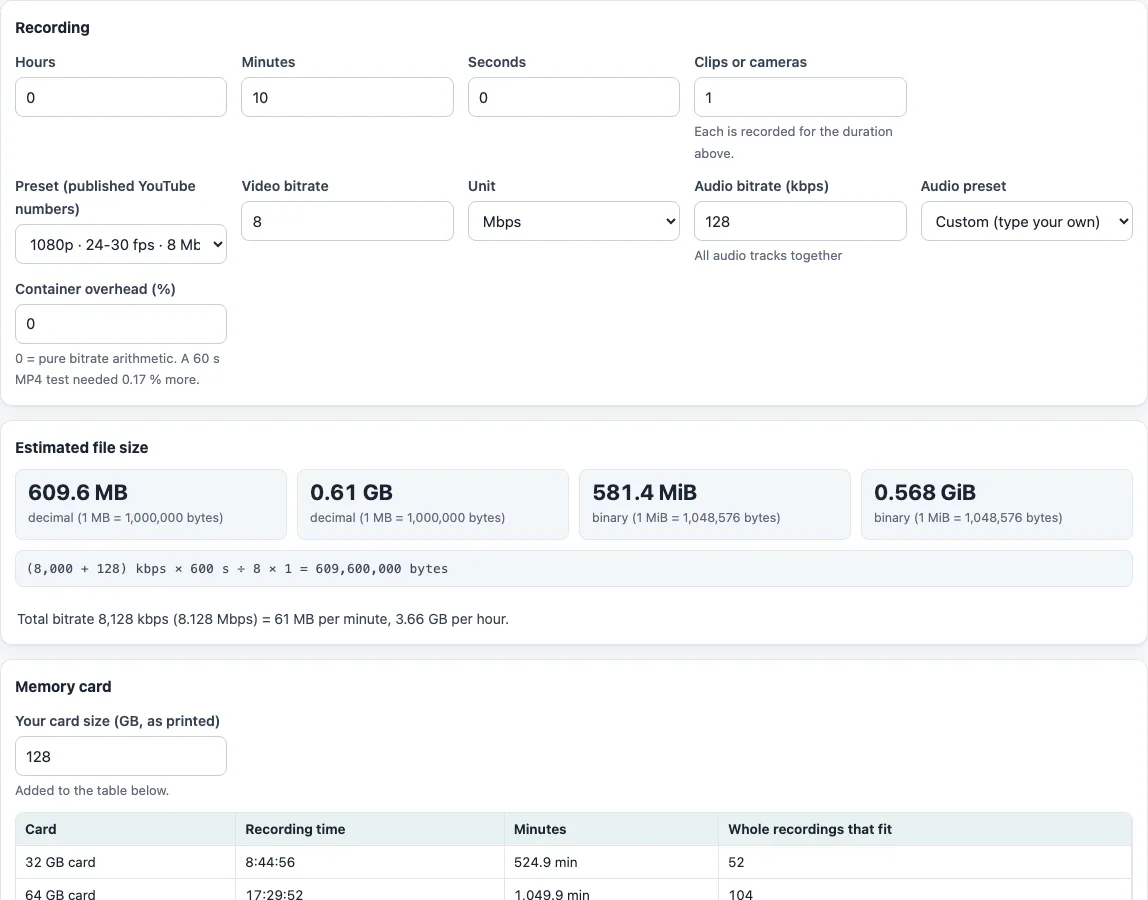
- Enter the length of the recording in “Hours”, “Minutes” and “Seconds”. The default is 0 / 10 / 0, which is ten minutes.
- Set “Clips or cameras” to the number of clips or cameras. The size is multiplied by this number.
- Open “Preset (published YouTube numbers)”. Its options are grouped as “YouTube upload, SDR”, “YouTube upload, HDR”, “YouTube Live, H.264” and “YouTube Live, H.265 / AV1”, and each reads like
1080p · 24-30 fps · 8 Mbps. The default is the SDR 1080p, 24-30 fps, 8 Mbps option. A preset fills in “Video bitrate” and “Unit”. - To use your own number, type it in “Video bitrate” and choose “Mbps” or “kbps” in “Unit”. The preset then switches to “Custom (type your own)”.
- Check “Audio bitrate (kbps)”. The default is 128. The “Audio preset” list offers “Mono, 128 kbps”, “Stereo, 384 kbps”, “5.1, 512 kbps” and “No audio, 0 kbps”.
- If you measured the container’s extra space, enter it in “Container overhead (%)”. The default is 0.
- Set “Your card size (GB, as printed)”. The default is 128. Any other size is added to the card table as an extra row.
- Read “Estimated file size” in MB, GB, MiB and GiB, the formula with your numbers, and the total bitrate with MB per minute and GB per hour.
Under “Memory card”, the table lists each card with its recording time as h:mm:ss, the same time in minutes, and the number of whole recordings that fit. With more than one clip, a line also shows the size of a single clip.
How big is a 10-minute 1080p video?
A 10-minute 1080p video at 8 Mbps video plus 128 kbps audio is about 609.6 MB, or 0.61 GB. Those are the default settings, and 8 Mbps is the figure YouTube publishes for 1080p SDR at 24 to 30 fps.
File size comes from bitrate multiplied by time. The tool uses this formula:
size (bytes) = (video kbps + audio kbps) × 1000 ÷ 8 × seconds × (1 + overhead%) × clips
Here kbps means kilobits per second, and 1000 bits make one kilobit. Dividing by 8 turns bits into bytes. For the example, (8,000 + 128) × 1000 ÷ 8 × 600 seconds = 609,600,000 bytes. The total bitrate is 8,128 kbps, which is about 61 MB per minute or 3.66 GB per hour.
If two cameras record the same scene, set “Clips or cameras” to 2. The size doubles, and the card table treats both clips as written to the same card at the same time.
How big is a 4K or MP4 video?
Pick the 2160p (4K) preset for your frame rate. YouTube’s SDR range for 24, 25 or 30 fps is 35 to 45 Mbps, and the preset list shows the low end and the high end as two options. Ten minutes at 35 Mbps plus 128 kbps audio is about 2.63 GB, and at 45 Mbps it is about 3.38 GB. There is no separate MP4 setting, because the container only adds a small share on top of the stream bitrates, which “Container overhead (%)” covers.
Which bitrates do the presets use?
For 1080p, YouTube’s published SDR upload numbers are 8 Mbps at 24, 25 or 30 fps and 12 Mbps at 48, 50 or 60 fps. For HDR they are 10 Mbps and 15 Mbps. The live presets use the “recommended” columns of YouTube’s live table. Source: YouTube “Recommended upload encoding settings” and “Choose live encoder settings, bitrates, and resolutions”, checked 2026-10-13.
Why does the file manager show a smaller number than the calculator?
The two use different units. The calculator shows decimal MB and GB, where 1 MB is 10^6 bytes and 1 GB is 10^9 bytes. It also shows binary MiB and GiB, where 1 MiB is 2^20 bytes and 1 GiB is 2^30 bytes. The binary numbers are smaller: the 609.6 MB example is 581.4 MiB, or 0.568 GiB. Many file managers use binary units but label them “MB” or “GB”, so the same file looks smaller there.
Memory cards work differently. Their sizes are printed in decimal GB, but formatting uses some of that space. The tool gives no figure for the gap, so the real room is a little less than the card table shows.
Frequently asked questions
How long can I record on a 128 GB card?
At 8,128 kbps total with one clip, a 128 GB card holds 125,984 seconds, which is 34:59:44. A 32 GB card holds 8:44:56 at the same bitrate. The default “Your card size (GB, as printed)” is 128, and the table also lists 32, 64 and 256 GB.
Does the container add size?
Yes, usually a little. The container is the wrapper, such as MP4, that holds the video and audio streams. “Container overhead (%)” defaults to 0. In our own test, a 60-second MP4 made with ffmpeg 7.1.1 (x264 CBR 5000 kbps and AAC 128 kbps) had an overall bit rate 0.17 % above the sum of its streams, and the file was 0.13 % larger than the plain bitrate arithmetic. Real files vary with variable bitrate, the container and extra tracks, so enter a percentage only when you have measured one.
Which preset should I pick for 4K video?
Pick the 2160p (4K) preset that matches your frame rate. YouTube’s published SDR range is 35 to 45 Mbps at 24, 25 or 30 fps, and 53 to 68 Mbps at 48, 50 or 60 fps. The low end and high end appear as separate options so you can compare both. Source: YouTube “Recommended upload encoding settings”, checked 2026-10-13.
Is there a GoPro preset?
No. We could not find a published GoPro bitrate table for each recording mode, so the tool has no GoPro preset. Check the bitrate in your camera manual, then type it in “Video bitrate” with the matching “Unit”.
Does this tool upload my video?
No. The calculation runs in your browser, and nothing leaves the browser. The tool works from the numbers you type, so you do not need to open your video file.
Related tools
- Video bitrate calculator: use it when you know the file size and length and need the bitrate.
- 1080p bitrate: use it to see the bitrates YouTube publishes for 1080p footage.
- Add subtitles to video: use it to preview subtitles on your video and get the ffmpeg command that adds them.
- Frame rate converter: use it when subtitle timing does not match the frame rate.
- Extract subtitles from MP4: use it when you need the subtitle text from an MP4 file.