TTML to SRT Converter (TTML, DFXP, XML)
Convert TTML, DFXP or XML caption files to SRT or WebVTT, with frame-based and tick-based times handled.
This free tool converts TTML, DFXP and XML subtitle files to SRT, the plain-text SubRip format. Paste TTML or DFXP text into the input box, drop a file onto it, or click Add files to open one, and the SRT result appears in the result box as you work.
It needs no sign-up, and it runs in your browser: the line under the input box states that nothing you type or open is uploaded. The page opens with a short four-cue example already loaded and its SRT result already shown, so you can see the output before you add your own file.
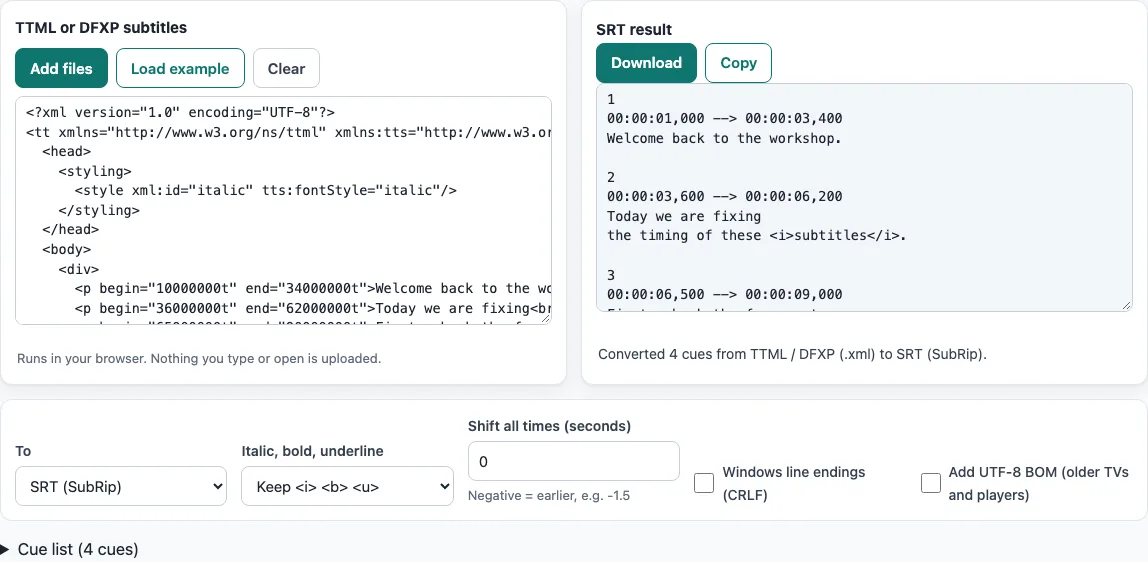
How to use the TTML to SRT converter
- Look at the TTML or DFXP subtitles input box. The example is already loaded, and the SRT result box shows its converted output.
- To convert your own file, click Add files and choose it. You can also drop a file onto the text box.
- To work with pasted text instead, clear the box with Clear and paste your TTML or DFXP text. Click Load example to bring the sample back.
- Read the status line, such as “Converted 4 cues from TTML / DFXP (.xml) to SRT (SubRip).” If a Notes list appears, read it to see what the tool fixed or skipped.
- Adjust the options if you need to. Choose a setting for Italic, bold, underline, enter a value such as
-1.5in Shift all times (seconds), and tick Windows line endings (CRLF) or Add UTF-8 BOM (older TVs and players) only if your player needs them. - Open the Cue list table to check the start and end times of each cue. It shows the first 300 cues.
- Click Download to save the SRT file, or Copy to copy the text. The downloaded file takes the name of your opened file with the
.srtextension. Pasted text is saved assubtitles.srt.
The To select offers “SRT (SubRip)” (the default) or “WebVTT (.vtt)”. Keep it on SRT for this page. The settings are kept in the page address, so a link that you save or share reproduces the same settings.
How do I convert TTML to SRT?
Each timed <p> element in a TTML file becomes one SRT cue. The tool reads its begin and end times, or begin plus dur when there is no end, and writes them in the form 00:00:11,467 --> 00:00:12,000, with a comma before the milliseconds. A paragraph with neither begin nor end has no timing, so it is skipped and reported in the Notes.
The begin, end and dur values on <body>, <div> and <p> are relative to their parent. An offset on a <div> is therefore added to every paragraph inside it. Each cue is written as a number line, a timing line, one or more text lines and a blank line, and the cues are numbered in order.
Is DFXP the same as TTML?
Yes. DFXP is the older name for TTML, and the name survives in some profile names. A .dfxp file is normally a TTML document, so this tool reads it the same way as a TTML file. Elements that carry a namespace prefix, such as <tt:p>, are read too.
Are frame-based times converted correctly?
Yes, as long as the file states its frame rate. The tool multiplies ttp:frameRate by ttp:frameRateMultiplier, so a frame rate of 30 with a multiplier of “1000 1001” gives 29.97 frames per second. A time such as 00:00:01:14 then means 1 second plus 14 frames, which is 14 ÷ 29.97 = 0.467 s, so the cue starts at 1.467 s. If no frame rate is given, the default of 30 is used.
Offset times such as 1.2s, 500ms, 48f and 10000000t are converted as well. The SMPTE time base is read as media time, so drop-frame counting is not applied. A frame number must be below the frame rate.
What happens to styles and positions?
Only the cue text and timing are carried over. Positions, colours, fonts and karaoke effects are not written to the SRT file. Italic, bold and underline survive as tags: styles set with tts:fontStyle, tts:fontWeight or tts:textDecoration, directly or through a style reference on a <p> or <span>, become <i>, <b> and <u>. The setting Remove all formatting writes plain text instead.
A <br/> becomes a line break. Runs of white space are collapsed, as a player would draw them.
Frequently asked questions
Is it free?
Yes. The tool is free and needs no sign-up, and there is no limit on the number of files.
Is my file uploaded?
No. The tool runs in your browser, and the line under the input box says that nothing you type or open is uploaded. Subtitle files you open are never uploaded.
Can I convert an XML subtitle file to SRT?
Yes, if the XML is a TTML or DFXP caption document. A caption file saved with a .xml extension is read the same way as a .dfxp file. Other XML files are not TTML and are not what this tool reads. The page then says that no subtitle timings or cues were found.
Can I convert several files at once?
Yes. Click Add files and choose two or more files. A Converted files list then shows each file with its cue count and a Download button, and Download all saves one file per converted file. The files are converted with the options that are set when you press the button.
What does the Notes list show?
The Notes list reports anything the tool fixed or skipped, such as a time that could not be read, a paragraph without a begin or end time, overlapping cues, cues out of order or empty cues. The status line also states how many cues a negative Shift all times (seconds) value removed.
Related tools
- Subtitle converter: use it when your subtitles are in a different format from TTML or DFXP.
- SRT to VTT converter: use it when you need a WebVTT (.vtt) file from an SRT file.
- VTT to SRT converter: use it when your subtitles are WebVTT and you need SRT.
- SBV to SRT converter: use it when your captions are in the SBV format.
- ASS to SRT converter: use it when your subtitles are ASS script files.
- Subtitle file formats compared: use it to see how TTML, SRT and other formats differ.
- SRT file format and checker: use it to check the structure of an SRT file.
- Subtitle shifter: use it to move an existing subtitle file earlier or later.