SRT to VTT Converter (SRT to WebVTT)
Paste or open an SRT file and get a valid WebVTT (.vtt) file for HTML5 video and web players, in your browser.
Use this free SRT to VTT converter to turn a SubRip (.srt) subtitle file into a WebVTT (.vtt) file. It runs in your browser, so there is nothing to install and no sign-up, and the subtitle files you open are never uploaded.
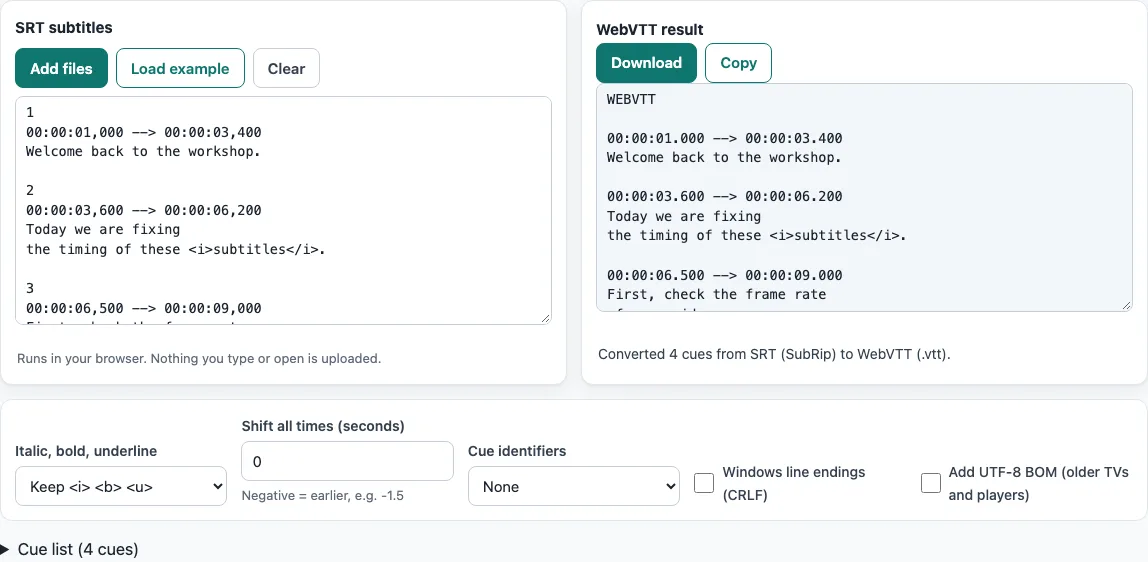
The page opens with a short four-cue workshop scene already loaded, and the WebVTT result is already shown, so you can see the output before you add your own file. The converter keeps each cue’s text and timing, writes the WEBVTT header, and changes the comma before the milliseconds to a full stop. You can also shift the timing, choose how cues are numbered, then download the result or copy it.
How to use the SRT to VTT converter
- Look at the example first. The SRT subtitles box holds the loaded example, and the WebVTT result box shows its conversion. You do not need to click anything to start.
- Load your own file. Click Add files and choose your
.srtfile, or drop the file onto the text box. You can also paste subtitle text. Pasted text is downloaded assubtitles.vtt. - Shift the timing if needed. Type a number in Shift all times (seconds), such as
-1.5to move every cue 1.5 seconds earlier. The step is 0.1. - Choose an option under Cue identifiers. “Keep existing” writes the SRT cue number above each timing line, “Number every cue” numbers the cues from 1, and “None” writes no identifier line. This page starts with “None”.
- Tick Windows line endings (CRLF) or Add UTF-8 BOM (older TVs and players) only if your player needs them. Both are off by default.
- Read the status line, the Notes list and the Cue list. The status line gives the result, and the Notes list shows anything the tool fixed or skipped.
- Click Download to save the
.vttfile, or click Copy to copy the text.
The Italic, bold, underline control defaults to Keep <i> <b> <u>, which keeps those three tags and removes every other tag. Choose “Remove all formatting” if you want plain text.
What is the difference between SRT and VTT?
SRT (SubRip) and WebVTT both store subtitle cues with a start time, an end time and text, but they are written to different rules. SRT is an older plain-text format with no formal specification, while WebVTT is a W3C standard for subtitles on the web.
An SRT cue has a number line, a timing line such as 00:00:03,600 --> 00:00:06,200, one or more text lines, and a blank line. The comma before the milliseconds is the most visible difference. WebVTT uses a full stop, as in 00:00:03.600, and its cue numbers are optional. Tags such as <i> and <b> are a common convention in SRT, not part of a standard.
How do I convert SRT to WebVTT?
Converting means reading each cue and writing it again under the WebVTT rules. The start and end times and the text are kept, and only the parts that WebVTT does not allow in the same form are changed.
The comma before the milliseconds becomes a full stop. Hours are always written, so 00:00:01,000 becomes 00:00:01.000. The tags <i>, <b> and <u> are kept. The <font> tag and other unknown tags are removed, because WebVTT has no <font> tag. SRT position codes such as {\an8} are dropped, since positions are not turned into WebVTT cue settings. Colours, fonts and karaoke effects are not carried over either, and the output has no WebVTT cue settings, STYLE blocks or NOTE comments, because an SRT file has nothing to take them from.
Text needs escaping too. A literal & becomes &, and a literal < or > becomes < or >. Inside text, --> becomes -->, because --> is reserved for timing lines. Blank lines inside a cue are removed, since a blank line ends a cue in both formats.
For comparison, ffmpeg 7.1.1 (ffmpeg -i in.srt out.vtt) keeps the same cue times. It writes a raw &, which WebVTT does not allow, while this tool writes &.
Frequently asked questions
Does it work online without installing anything?
Yes. The converter runs in your browser, so you open the page and start. There is nothing to download or install.
Is it free?
Yes. The converter is free to use, and you do not need to sign up.
Is my file uploaded?
No. Everything runs in your browser, and the files you open or paste are not uploaded.
Can I convert several files at once?
Yes. Click Add files and choose two or more files. A Converted files list shows each file with its cue count and a Download button, and Download all saves one file per entry. Files are converted with the options set at that moment.
What about accents, Chinese or Japanese text?
The converter reads UTF-8 and UTF-16 files correctly, with or without a byte order mark, so accented letters, Chinese and Japanese characters are kept. The .vtt output is UTF-8, the encoding WebVTT files use. If an older TV or player still shows garbled characters, try ticking Add UTF-8 BOM (older TVs and players).
Why must a VTT file start with WEBVTT?
The first line tells a player that the file is WebVTT. The W3C specification requires the word WEBVTT, optionally followed by a space or tab and header text, and then two or more line terminators. The converter writes this header and a blank line at the top of every file.
Related tools
- Subtitle converter - Convert subtitles between several formats when your source is not SRT or VTT.
- VTT to SRT converter - Use this when you need to go the other way, from WebVTT back to SRT.
- SBV to SRT converter - Use this when your subtitles are in SBV format and you want SRT.
- ASS to SRT converter - Use this for subtitle files in ASS format that need to become SRT.
- TTML to SRT converter - Use this for TTML subtitle files that need to become SRT.
- Subtitle file formats compared - Read this to compare how the main subtitle formats store timing and text.
- SRT file format and checker - Read this to learn the exact layout of an SRT file and check one for mistakes.
- Subtitle shifter - Use this to move subtitle timing earlier or later without converting the format.