SRT File Format: Check, Fix and Understand Your .srt
Paste or open an .srt file to see how it is read, every problem with its line number, and a cleaned copy to download.
The SRT file format is the plain-text layout behind .srt subtitle files, and this page checks any SRT file against it. Paste an SRT file into the “SRT file” box, drop it in, or open it from your computer, and the tool lists each problem it finds, grouped as “File”, “SRT structure” and “Quality limits”, with the line where each one sits. It then gives you a cleaned copy to download or copy.
Use it when SRT subs will not load in a player, when timings look wrong, or when a file from another program needs tidying before you use it. The checker opens with an example file already loaded, so you can see how the results look before you try your own. The tool runs fully in your browser, so nothing is uploaded. It is free and needs no sign-up.
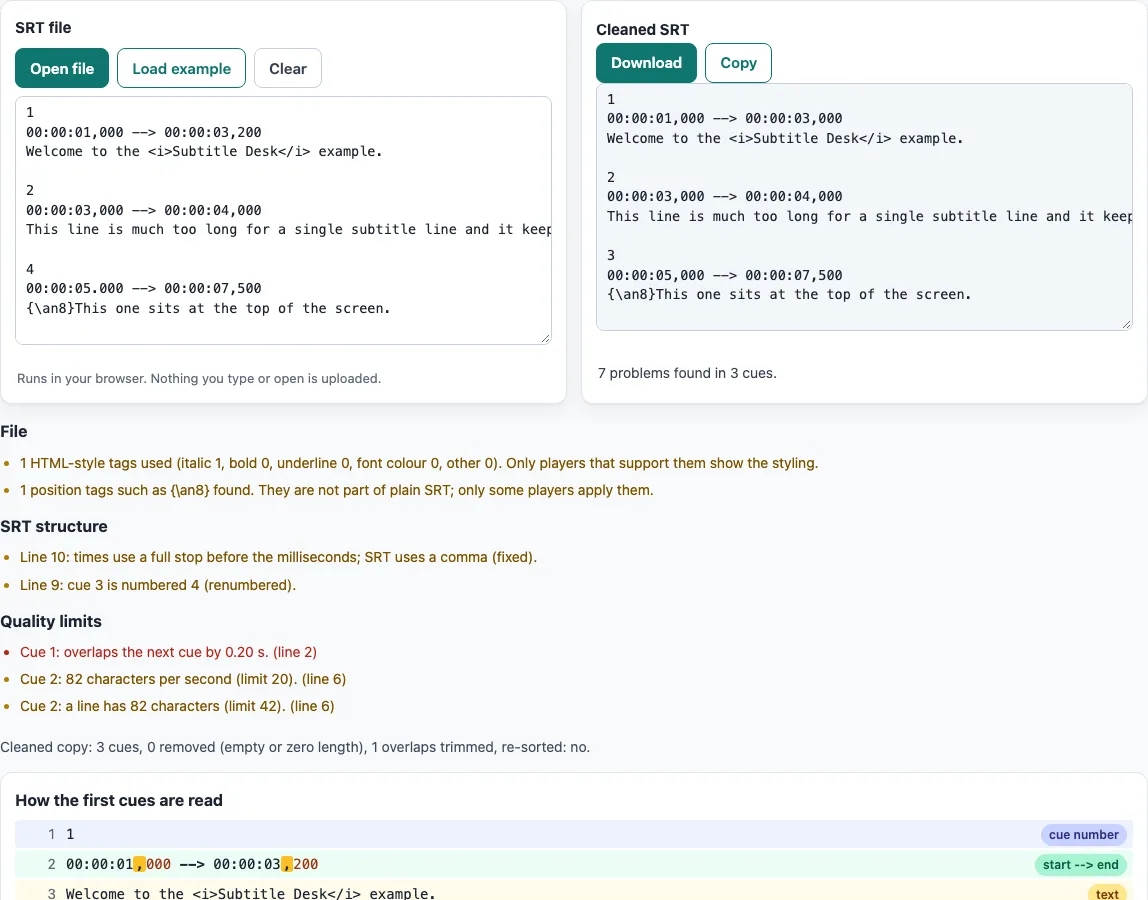
How to use the SRT file checker
- Open the page. The “SRT file” box already holds an example file with a few deliberate problems, so you can see the results straight away.
- To check your own file, paste its text into the “SRT file” box, drop the file onto the box, or click “Open file”. The tool accepts
.srt,.txtand.subfiles. - Read the findings. They are grouped into “File”, “SRT structure” and “Quality limits”. Quality items show their line number.
- Look at “How the first cues are read”. It shows the first 3 cues line by line, with the cue number, the “start –> end” line, the text and the blank line that ends the cue marked separately.
- Adjust the settings if you need to. “Trim overlapping cues” is on by default. “Formatting tags” can be “Keep all tags”, “Keep only i, b, u, font” or “Remove all tags”. “Windows line endings (CRLF)” is off by default. The limit fields default to 20 characters per second, 42 per line, 2 lines, 833 to 7000 ms and a minimum gap of 83 ms. Entering 0 turns a check off.
- Collect the fixed file from the “Cleaned SRT” box. Click “Download” to save it as
<name>-clean.srt, or “Copy” to copy the text. The cleaned copy is sorted by start time and renumbered from 1.
All settings are kept in the page address, so a link keeps them. For a new file, the “Blank SRT template” section offers “Download template.srt”, “Copy template” and “Load template”.
SRT file meaning: what does SRT stand for?
An SRT file is a plain-text file that stores subtitles and the times they appear on screen. It holds no video or audio: a player lays the text over the picture. The extension is .srt, and the name comes from SubRip, the program the format was first associated with. If you searched for “str” by mistake, the extension is .srt. You will also see these files called SRT subs, SRT subtitles or captions.
SRT has no formal specification, so SubRip is treated as the de-facto format. The Library of Congress format description says it is plain text, lists its MIME type as text/plain, and says the file name should match the media file, such as movie.srt beside movie.mp4.
What is the SRT format structure?
An SRT file is a list of blocks called cues, and each cue has four parts:
1
00:00:01,000 --> 00:00:03,500
Welcome to the example.
The parts are a sequential counter, a start and end time separated by -->, one or more lines of subtitle text, and a blank line before the next cue. Timecodes use hours, minutes, seconds and milliseconds, with a comma before the milliseconds, as in 00:00:01,000. Some variants put the counter on the same line as the timing. WebVTT, which SRT was the basis for, uses a full stop before the milliseconds and starts with a WEBVTT header, so the two formats are not interchangeable without conversion.
What does the checker report?
A missing or wrong cue number, a dot used in place of the comma, a blank line inside a cue, empty text and an unreadable time are reported as “SRT structure” items. Overlapping cues, lines that are too long, too many lines, too many characters per second, and cues shown for too short or too long a time are reported as “Quality limits”. The default limits are the checker’s own settings, based on the Netflix English timed-text style guide. They are style-guide recommendations, not part of the SRT format itself, and you can change or switch off any of them.
Frequently asked questions
How do I open an SRT file?
An SRT file is plain text, so any text editor can open it and show the cue numbers, times and subtitle lines. A media player that accepts subtitles can also load it alongside the matching video. To see how it is read, click “Open file” or paste the text into the “SRT file” box.
Why do special characters look wrong?
The SRT format has no formal character-encoding standard. SubRip defaults to Windows-1252 but also offers UTF-8 and UTF-16, so a file saved in one encoding can show garbled text in another. YouTube’s help page says an SRT file must be plain UTF-8, and Matroska stores SRT text as UTF-8. The checker flags a UTF-8 byte order mark, UTF-16, invalid UTF-8, and sequences such as “é” that mean UTF-8 text was read in the wrong encoding. Saving the file again as UTF-8 usually fixes accented letters, and the cleaned copy is written as UTF-8.
Do SRT files support italics, colours and positions?
SRT allows a limited set of HTML-style formatting: bold, italic, underline and colour, and how it looks depends on the player. Position codes such as {\an8} are not part of plain SRT, and only some players apply them. YouTube’s help page says that for SRT only basic versions are accepted and no style markup is recognised. The checker reports <i>-style tags and {\an8} position tags so you can see them. “Remove all tags” strips both from the cleaned copy, while “Keep only i, b, u, font” keeps position tags.
How do I sync an SRT file with a video?
This tool does not play the video and does not move cue times, apart from trimming overlaps, so it cannot line subtitles up with a clip. To move every cue earlier or later, use the Subtitle shifter. To change single cues by hand, use the Online SRT editor. Once the timings are right, load the file into your player next to the video.
Is my SRT file uploaded when I use this tool?
No. The tool runs fully in your browser, and subtitle files you open are never uploaded.
What is the difference between SRT and WebVTT?
SRT is the older, simpler format, and WebVTT was based on it. The visible differences are the full stop before milliseconds in WebVTT, its WEBVTT header and its UTF-8 requirement; WebVTT also supports positioning. To convert between them, use the SRT to VTT converter.
Related tools
- Subtitle file formats compared: read this when you need to choose between SRT, WebVTT and other subtitle formats.
- Online SRT editor: use this when you want to change the text or timings of an SRT file by hand.
- Subtitle shifter: use this when all subtitles are early or late by the same amount.
- Subtitle converter: use this when your file is in a different format and needs converting.
- SRT to VTT converter: use this when a player or platform asks for WebVTT.
- VTT to SRT converter: use this when you have a WebVTT file and need SRT.
- DJI SRT file viewer: use this when your SRT file came from a DJI drone and you want to view its data.