SBV to SRT Converter
Convert a YouTube .sbv caption file to SubRip (.srt) or WebVTT: paste it or open the file.
This free SBV to SRT converter turns YouTube SBV subtitle files into SRT (SubRip) files directly in your browser. SBV is the caption format YouTube accepts, and the converter turns each cue’s timing and text into the numbered layout that most video players read.
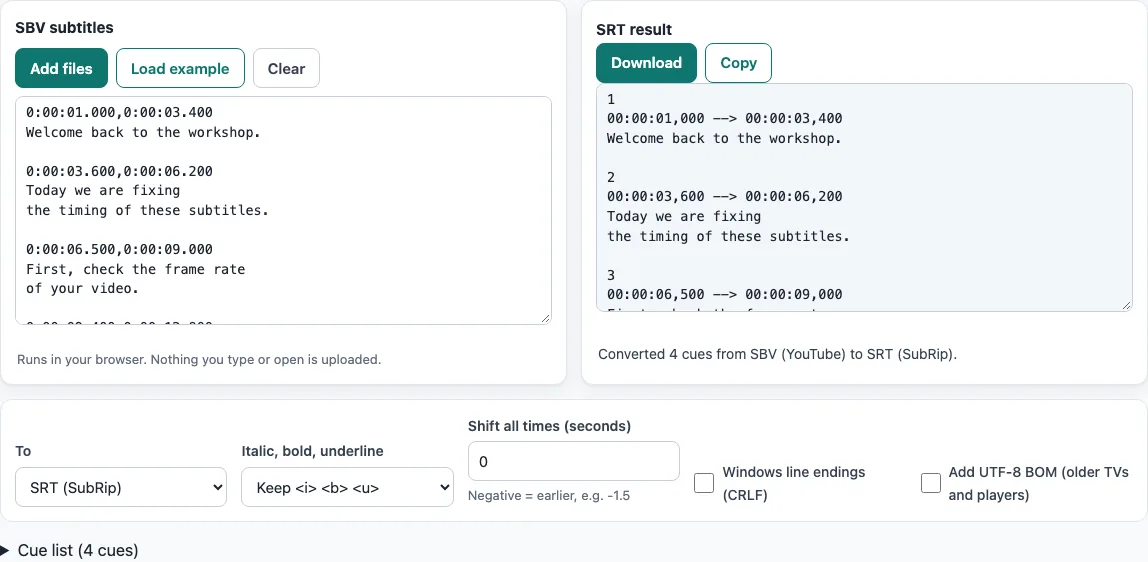
The page opens with a short four-cue workshop scene already loaded and its SRT result already shown, so you can see the output before you open a file of your own. No sign-up is needed, and the files you open are never uploaded. If your player needs WebVTT instead, you can choose WebVTT (.vtt) as the output.
How to use the SBV to SRT converter
- The page opens with a four-cue example in the SBV subtitles box and the result in SRT result. Nothing needs clicking first. To load the example again at any time, press Load example.
- To convert your own file, press Add files and choose one or more
.sbvfiles. You can also drop a file onto the text box or paste the SBV text into it. - Check the To select. It is set to “SRT (SubRip)” by default. Choose “WebVTT (.vtt)” only if your player needs that format.
- If the subtitles are early or late, enter a number in Shift all times (seconds). Use a negative number to move them earlier, for example
-1.5. - If your target device needs Windows line endings, tick Windows line endings (CRLF). For older TVs and players, tick Add UTF-8 BOM (older TVs and players). Both are off by default.
- Read the one-line status and the Notes list, if one appears.
- Open the Cue list table to check the start and end times of each cue.
- Press Download to save the file, or Copy to paste the result somewhere else.
The downloaded file takes the name of your original file with the new extension. Text pasted into the box is saved as subtitles.srt. Press Clear to empty the box.
What is an SBV file?
An SBV file is a plain text caption file in the SubViewer style. YouTube accepts it for captions, and the file can use the .sbv or .sub extension. Each cue has a timing line such as 0:00:00.599,0:00:04.160, one or more lines of text, and a blank line. YouTube’s help says only basic versions are supported and that the file carries no style information, so colours, positions and fonts are not part of it.
How do I convert YouTube SBV to SRT?
The main change is the timing format. SBV writes each time as h:mm:ss.mmm, with a dot before the milliseconds, and separates the start and end with a comma. SRT writes each time as hh:mm:ss,mmm, with a comma before the milliseconds, and separates the start and end with -->. The tool applies these rules to every cue:
SBV:  0:00:01.000,0:00:03.500
SRT:  00:00:01,000 --> 00:00:03,500
Cues are numbered from 1. Fractions are read as decimals, so .5 becomes 500 ms. An hour count above 99 is kept, such as 100:00:00,000. A [br] in the text is read as a real line break. For example, the cue 0:00:04.000,0:00:06.250 with the text [br]first[br]second becomes the SRT cue 00:00:04,000 --> 00:00:06,250 with the two lines first and second. YouTube’s help says SBV files must be plain UTF-8, and the tool reads UTF-8 and UTF-16 files correctly.
How do I convert an SBV file to text?
The SBV to SRT page writes SRT or WebVTT, so the timings stay in the output. To get only the words, use the subtitle converter on the home page, open the file there and choose “Plain text (.txt)” under To. It writes the caption text without any times.
Can I convert several SBV files at once?
Yes. Press Add files and choose two or more files. A Converted files list then shows each file with its cue count and its own Download button. Press Download all to save one file per converted file. The files are converted with the options that are set when you press the button.
Frequently asked questions
Is it free?
Yes. The converter is free and needs no sign-up, and there is no limit on the number of files.
Is my file uploaded?
No. Everything runs in your browser, and subtitle files and videos you open are never uploaded. The line under the SBV subtitles box says so: “Runs in your browser. Nothing you type or open is uploaded.”
Does the result keep colours, positions or fonts?
No. The result keeps only cue text and timing. Positions, colours, fonts and karaoke effects are not carried over. SBV itself has no styling, so there are no tags to keep.
Can I get WebVTT instead of SRT?
Yes. Set the To select to “WebVTT (.vtt)”. The timings then use dots, such as 00:00:01.000 --> 00:00:03.500, and the downloaded file takes the .vtt extension.
What about accents, Chinese or Japanese text?
UTF-8 and UTF-16 files are read correctly, with or without a byte order mark, and the result is written as UTF-8. If an older TV or player shows garbled characters, tick Add UTF-8 BOM (older TVs and players).
What does the Notes list tell me?
The Notes list appears when the tool fixed or skipped something in your file, such as overlapping cues, cues out of order or empty cues. Read it before you use the converted file.
Related tools
- Subtitle converter - use this when your file is in a different format and you need to choose the output yourself.
- SRT to VTT converter - use this when you have an SRT file and need WebVTT for a web player.
- VTT to SRT converter - use this when your captions are WebVTT and a player needs SRT.
- ASS to SRT converter - use this when your subtitles are in the ASS format with styling.
- TTML to SRT converter - use this when your captions are in TTML (XML) format.
- Subtitle file formats compared - use this to see how SBV, SRT, WebVTT and other formats differ.
- SRT file format and checker - use this to learn the exact layout of an SRT file and check one.
- Subtitle shifter - use this when you only need to move existing subtitles earlier or later.