M4A vs MP3: Compare File Size and Format
Enter the length, channels, sample rate and bit depth of a recording and the bitrate you would use, to see the file size of MP3, AAC in M4A, Ogg Vorbis, FLAC, WAV and AIFF side by side.
This M4A vs MP3 tool shows how big the same recording is as an MP3, an M4A file with AAC, an Ogg Vorbis file, a FLAC file, a WAV file or an AIFF file. You enter the length, channels, sample rate, bit depth and bitrates, and it calculates the file sizes, files per GB and minutes per GB side by side. It runs in your browser, and nothing you enter is uploaded.
Use it to decide which format fits your storage or your device before you convert anything. A table below the result says what each format is: a codec or a container, lossy or lossless, with the source named.
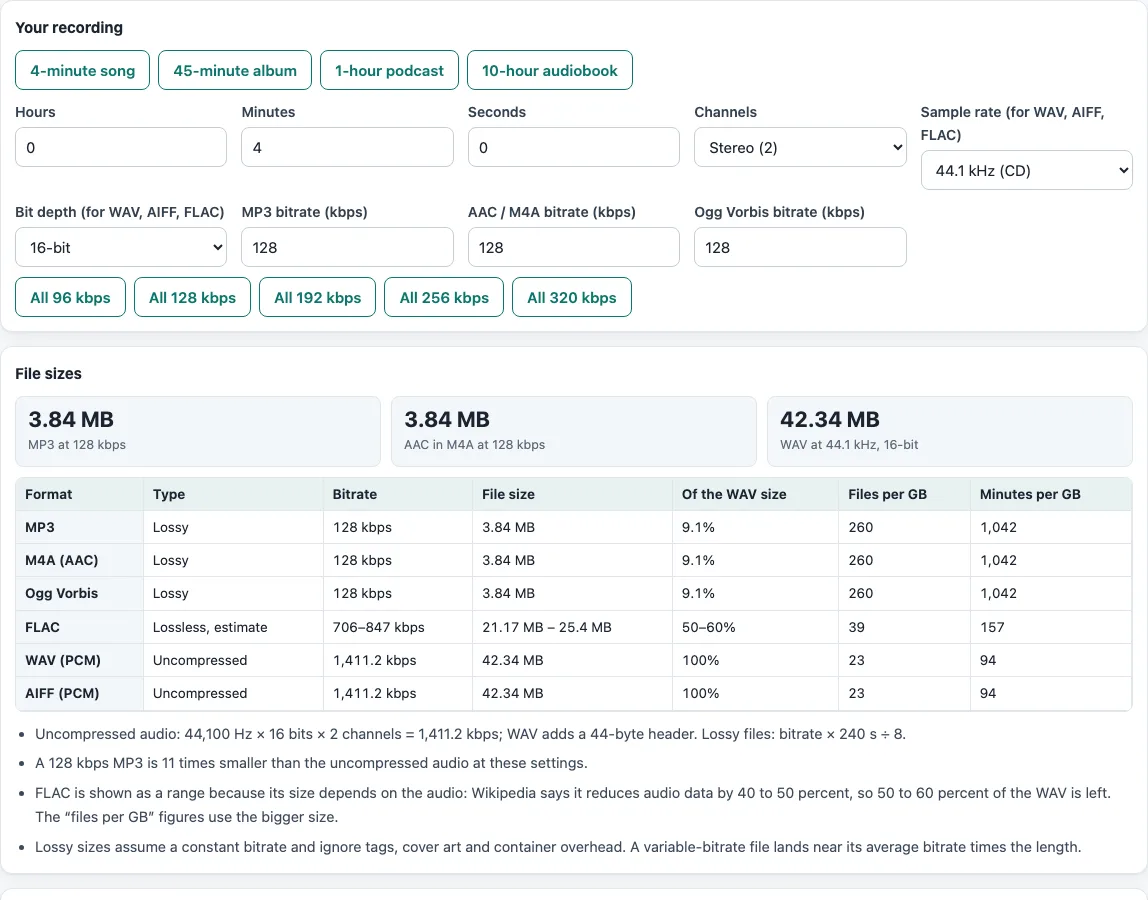
How to use the M4A vs MP3 tool
- Set the length. Click “4-minute song”, “45-minute album”, “1-hour podcast” or “10-hour audiobook”, or type Hours, Minutes and Seconds.
- Choose Channels: Mono (1), Stereo (2) or 5.1 surround (6).
- For WAV, AIFF and FLAC, set the Sample rate and Bit depth. The defaults, 44.1 kHz and 16-bit, are the audio CD values.
- Set “MP3 bitrate (kbps)”, “AAC / M4A bitrate (kbps)” and “Ogg Vorbis bitrate (kbps)”. The default is 128 for each. The buttons “All 96 kbps” to “All 320 kbps” set all three at once.
- Read the boxes under “File sizes” for MP3, AAC in M4A and WAV.
- Read the table. For each format it gives the type (Lossy, Lossless or Uncompressed), the bitrate, the file size, the share of the WAV size, and the files and minutes per GB. FLAC is shown as a range because its size depends on the audio.
- Read the notes under the table. They repeat the formulas with your numbers, say how many times smaller the MP3 is than the uncompressed audio, and warn you when a WAV at your settings would pass 4 GiB.
- Open “What each format is” to see which formats are codecs, which are containers, and which are lossy or lossless.
Your settings stay in the page address, so you can copy the link to come back to the same numbers.
Is M4A better than MP3?
Neither is better in general, because they are different kinds of things. M4A is a file extension for an MP4 container, and that container usually holds AAC audio, which is lossy. MP3 is an audio format on its own. At the same bitrate the two files are the same size. MPEG-1 Layer III allows 14 MP3 bitrates from 32 to 320 kbps, and Wikipedia says 128 kbps is commonly used. Wikipedia says AAC generally achieves higher sound quality than MP3 at the same bit rate, and it also notes that MP3 has near-universal hardware and software support. We ran no listening test, and encoders differ at the same bitrate.
The lossy size is bitrate × 1000 ÷ 8 × seconds. A 4-minute song (240 seconds) at 128 kbps is 3,840,000 bytes, or 3.84 MB, for MP3, AAC and Ogg Vorbis alike. We encoded a 4-minute test signal with ffmpeg: the MP3 came to 3,841,087 bytes and the .m4a to 3,890,714 bytes, 1.3% more because of the container.
Is M4A the same as AAC?
No. AAC is the codec, the way the sound is compressed. M4A is the MP4 container that holds it. Apple’s lossless codec, ALAC, is frequently stored in the same kind of container with the same .m4a extension, so the extension alone does not tell you whether a file is lossy or lossless.
MP3 vs WAV, FLAC and AIFF: how big are they?
WAV usually holds uncompressed PCM, so its size is sample rate × bit depth ÷ 8 × channels × seconds, plus a 44-byte header. CD audio, 44.1 kHz at 16 bits in stereo, is 1,411.2 kbps, which makes a 4-minute WAV 42,336,044 bytes (42.3 MB). The 128 kbps MP3 is 11 times smaller. Wikipedia says FLAC reduces audio data by 40% to 50%, so the tool shows FLAC as 50% to 60% of the WAV, 21.2 to 25.4 MB here. AIFF holds the same PCM data as WAV, so the sizes match. A WAV file must stay under 4 GiB, which is about 6.8 hours of CD-quality audio and about 2.1 hours at 96 kHz, 24-bit stereo, so the tool warns you when a recording would not fit.
Frequently asked questions
What is the difference between MP3 and WAV?
MP3 is lossy: it discards some audio detail to make the file small. WAV usually stores uncompressed PCM, which keeps everything. For a 4-minute stereo recording at 44.1 kHz, the WAV is about 42.3 MB and a 128 kbps MP3 is about 3.84 MB.
FLAC vs MP3: which is smaller?
The MP3. FLAC is lossless: it decodes to exactly the original audio, but Wikipedia puts the reduction at 40% to 50%, so the file stays large. A 128 kbps MP3 is about 9% of the WAV size. Wikipedia also notes that FLAC playback is less common in portable players than MP3.
AAC vs MP3: is one smaller at the same bitrate?
No. At the same bitrate the sizes are the same, so the question is quality and support. Wikipedia says AAC generally achieves higher sound quality than MP3 at the same bit rate. MDN says Firefox relies on the operating system to play AAC.
OGG vs MP3: what is the difference?
Ogg is a free container, and Vorbis is the codec usually stored in it. MDN says Vorbis is generally more efficient than MP3 in size and bit rate at similar quality, and that Ogg containers are not universally supported.
WAV vs AIFF: what is the difference?
Both usually hold the same uncompressed PCM, so files with the same settings are the same size. AIFF is Apple’s format and is big-endian. WAV, from IBM and Microsoft, is little-endian and limited to files under 4 GiB, which is about 6.8 hours of CD-quality audio.
How many songs fit in 1 GB?
At 128 kbps, 260 songs of 4 minutes fit in 1 GB (1,000,000,000 bytes). At 320 kbps it is 104. As CD-quality WAV it is 23.
Is anything uploaded?
No. The calculation runs in your browser.
Related tools
- Video File Size Calculator: get a video file’s size from its bitrate, length and audio.
- Video Bitrate Calculator: work out the bitrate that fits a target file size.
- H.264 vs H.265: estimate how much smaller the same video gets with H.265.
- Extract Subtitle From MP4: open an MP4 and save its subtitle tracks, the same container that holds M4A audio.
- 1080p vs 4K: compare pixels, bitrate and size for two resolutions.