H264 vs H265: Compare File Size, Bitrate and Compatibility
Enter a resolution, frame rate and length to estimate how big the same video is in H.264 and in H.265 (HEVC), with a bitrate saving you can adjust. Copy the ffmpeg commands for both and compare support and licensing.
This H264 vs H265 tool estimates how big the same video is when it is encoded with H.264 (AVC) and with H.265 (HEVC). Sources report that H.265 needs 25% to 50% less bitrate than H.264 at the same quality. The tool turns that range into file sizes for your resolution, frame rate and length, and you can change the saving to match your own tests.
It also writes the ffmpeg commands for libx264 and libx265, and it puts H.264, H.265 and AV1 side by side in a table of release dates, licensing and browser support, with the source named in each cell. It runs in your browser and uploads nothing.
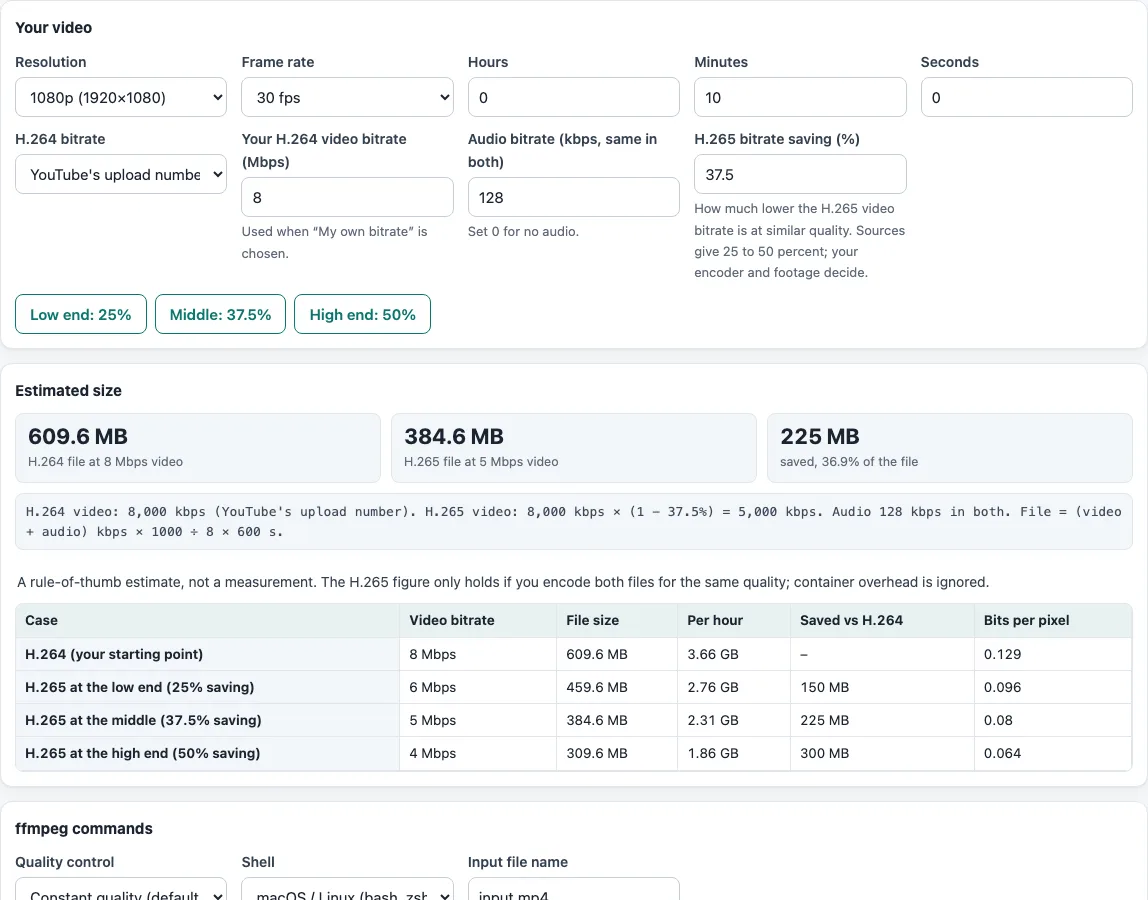
How to use the H264 vs H265 tool
- Pick a Resolution (1080p is the default) and a Frame rate (30 fps is the default).
- Enter the length in Hours, Minutes and Seconds. The default is 10 minutes.
- Under “H.264 bitrate”, keep “YouTube’s upload number (SDR)” to start from YouTube’s recommended bitrate for that resolution and frame rate, or choose “My own bitrate” and type a value in “Your H.264 video bitrate (Mbps)”.
- Set “Audio bitrate (kbps, same in both)”. Use 0 for a video without sound.
- Set “H.265 bitrate saving (%)”. The default is 37.5, and the buttons “Low end: 25%”, “Middle: 37.5%” and “High end: 50%” fill it in. You can type any value from 0 to 90.
- Read the three boxes under “Estimated size”, then the table. It starts with H.264 as your baseline, then shows H.265 at 25%, 37.5%, 50% and at your own saving, with the video bitrate, file size, size per hour, amount saved and bits per pixel.
- In “ffmpeg commands”, choose “Constant quality (default CRF)” or “Target bitrate (from the estimate)”, pick your Shell and type the Input file name.
- Press Copy or Download on the “H.264 (libx264)” or “H.265 (libx265)” box and run the command in a terminal.
Your settings stay in the page address, so you can copy the link to share the same estimate.
HEVC vs H.264: is H.265 smaller?
At the same quality, yes. Wikipedia says HEVC can reach 25% to 50% better compression than AVC (H.264), and MDN says it can theoretically reach half the size. The starting value of 37.5% is the middle of that range. It is a rule of thumb: the real saving depends on the footage, the encoder and its settings.
The saving applies only to the video bitrate, so audio and container overhead stay the same. For a 10-minute 1080p30 video with H.264 at 8 Mbps and 128 kbps audio, the file is 609.6 MB. At 37.5%, the H.265 video is 5 Mbps and the file is 384.6 MB, which is 225 MB smaller. The formulas are H.265 kbps = H.264 kbps × (1 − saving) and size = (video + audio kbps) × 1000 ÷ 8 × seconds.
How much do published tests save?
Wikipedia lists tests of HEVC against H.264. An April 2013 test at 3840×2160 found 45% lower bitrate by PSNR. A May 2014 test scored by viewers found 52% at 480p, 56% at 720p, 62% at 1080p and 64% at 4K UHD, and 59% on average. An August 2014 4K test found 52.6%. These used research encoders named HM and JM, not x264 and x265, so treat them as the range the 25% to 50% comes from, not as a promise for your file.
Which is better, H.264 or H.265?
Neither is better in every case. H.265 compresses more, but it was designed at the expense of more computing. H.264 is broadly compatible with browsers and hardware. Licensing differs too: MDN says H.264 needs a licence for commercial use, though the Via LA pool charges no fees for free internet streaming, while HEVC fees fall on developers and Wikipedia says the combined fees are higher than for AVC.
How do the ffmpeg commands compare the two codecs?
In constant-quality mode the tool uses each encoder’s default: CRF 23 for libx264 and CRF 28 for libx265. A higher CRF gives a smaller file and lower quality, and the two scales are not equal, so the commands are a starting point. In bitrate mode they use the bitrates from the estimate. Encode a short clip both ways and compare the files yourself.
Frequently asked questions
What is HEVC vs H.264?
HEVC and H.265 are the same codec, also called MPEG-H Part 2. H.264 is also called AVC or MPEG-4 Part 10. H.264 came first: its first version was completed in May 2003, and HEVC’s first version was ratified in January 2013.
AV1 vs H.265: which should I choose?
MDN says AV1 compresses better than HEVC and is royalty-free. Safari plays AV1 only on devices with a hardware decoder, such as M3 MacBooks and later and the iPhone 15 Pro and later. No figure for AV1 against HEVC was published in the sources used here, so the estimate covers H.264 and H.265 only.
Will H.265 play on my device or browser?
Chrome supports it from version 107, using hardware decoding on Windows, Linux and ChromeOS, and on all devices on macOS 11 and Android 5.0 or later. Safari supports it from version 11 and Opera from version 94. Edge on Windows needs hardware support and the HEVC video extensions from the Microsoft Store. Firefox added it on Windows in 134, macOS in 136, and Linux and Android in 137.
What CRF should I use?
Start with the defaults, 23 for libx264 and 28 for libx265. They are not equal-quality settings, so encode a short test clip with each and compare.
Does H.265 take longer to encode?
Wikipedia says HEVC was designed for lower bitrates at the expense of increased computational complexity. No timing figure is given here, so time a short clip on your own computer.
MP4 or MKV?
Both are containers, not codecs. MP4 is a common container for both H.264 and H.265, and the commands here write .mp4 files. This page does not compare containers.
Related tools
- Video Bitrate Calculator: work out the bitrate that fits a target file size.
- Video File Size Calculator: get the file size from a bitrate, a length and the audio.
- 1080p Bitrate: look up YouTube’s recommended bitrate for a resolution and frame rate.
- 1080p vs 4K: compare pixels, bitrate and size for two resolutions.
- Adding Subtitles to Video: preview an SRT on your video and copy the ffmpeg command for soft or burned-in subtitles.