Extract SRT From MKV (and MKS)
Open an .mkv, .mks or .webm file and save its subtitle tracks as SRT, WebVTT or the original ASS. The video is read locally and never uploaded.
.mkv, .mks, .mka and .webm files, so an MKS to SRT conversion works the same way. Nothing you open is uploaded, and no sign-up is needed. The tool reads the file in slices, so a large video never has to fit in memory.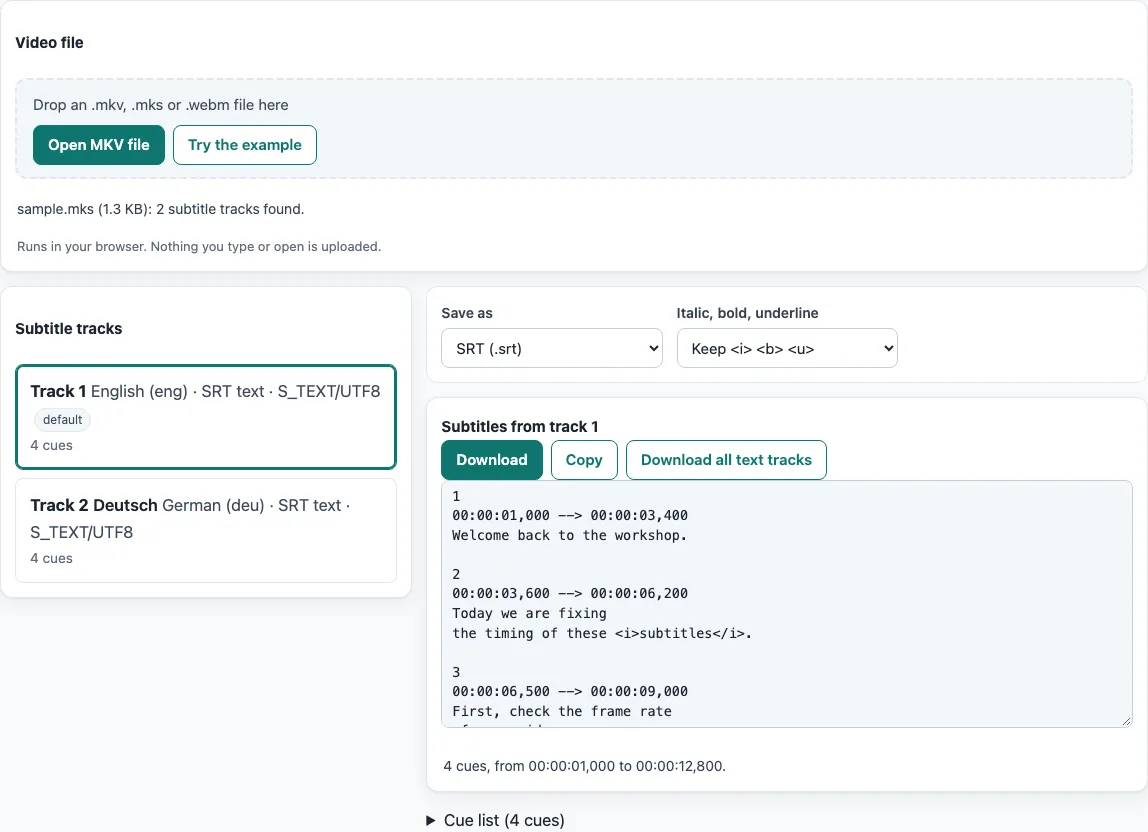
How to use the extract SRT from MKV tool
- Click “Open MKV file” and choose your file, or drop it on the dashed area. The page opens with a built-in 1.3 KB
sample.mksalready loaded, with English and German SRT tracks. Click “Try the example” to load it again. - Wait while the progress bar shows the read position. To stop, click “Cancel”. The tool then shows “Cancelled. Nothing was kept.”
- Look at the “Subtitle tracks” list. Each row shows the track number, the language, the format, the codec ID and the number of cues, with “default” and “forced” badges where they apply. Click a text track to preview it. The first text track is selected automatically.
- Open “Save as”. Keep “SRT (.srt)”, the default, or choose “WebVTT (.vtt)” or “Plain text (.txt)”. “Original ASS/SSA (.ass)” is offered only for ASS or SSA tracks.
- Open “Italic, bold, underline”. “Keep
<i> <b> <u>” is the default. You can also choose “Keep all tags” or “Remove all formatting”. - Under “Subtitles from track N”, click “Download” to save the file or “Copy” to copy the text. To save every text track, click “Download all text tracks”. The stats line shows the cue count, the first start time and the last end time, and a collapsible “Cue list” shows every cue.
Your choices in “Save as” and “Italic, bold, underline” are kept in the page address. If a track is a picture track, the list explains why it cannot be saved as text.
How do I extract SRT from MKV?
An SRT track inside an MKV is plain UTF-8 text stored in blocks, with no CodecPrivate. Each block’s start time comes from the block timestamp, and its end comes from BlockDuration. The tool calculates the start as (Cluster Timestamp + relative timestamp) × TimestampScale, which is 1 ms by default, and writes one SRT cue per block. For the built-in example, the first cue is 00:00:01,000 --> 00:00:03,400 with the text “Welcome back to the workshop.”
What is an MKS file and how do I convert MKS to SRT?
An MKS file is a Matroska file that contains only subtitles, as made by MKVToolNix or ffmpeg. The .mks extension is a convention, and this tool opens it like an MKV. To convert it, open the file and save the track as SRT. The built-in example is a 1.3 KB .mks file with English and German tracks.
Can I extract SRT from MKV on a Mac?
Yes. The tool runs in a web browser, so you open the page in your Mac’s browser and do not install a program. The steps are the same as on any other computer. If you prefer the command line, ffmpeg -i input.mkv -map 0:s:0 output.srt saves the first subtitle stream, and mkvextract movie.mkv tracks 2:subs.srt saves the track with ID 2.
Is it online without uploading?
The page is online, but your file is not sent anywhere. The tool reads the MKV locally in 1 MB windows, or 16 KB windows while it skips large video blocks, so the whole video is never loaded. In a test, a 2.3 GB MKV was read and listed in 3.6 seconds. The progress bar shows how far the reading has got, and “Cancel” stops it.
Why does my MKV subtitle track not become SRT?
Usually the track stores pictures, not text. PGS (S_HDMV/PGS) and VobSub (S_VOBSUB) tracks are image subtitles, and turning them into SRT needs OCR, which this tool does not do. For a PGS track, the “Download raw .sup” button saves the segments as a .sup file. Encrypted tracks, and tracks compressed with bzlib or lzo, are listed with a reason and cannot be previewed.
Which formats can I get?
From any text track you can get SRT (.srt), the default, WebVTT (.vtt) and plain text (.txt). From an ASS or SSA track you can also get “Original ASS/SSA (.ass)”. ASS keeps styling such as colours, positions and fonts, while SRT holds only text and timing, so converting an ASS track to SRT loses that styling.
What if the file has no subtitle track?
Then there is nothing to extract, and the page says which kinds of tracks the file holds. Subtitles that are burned into the picture are part of the video frames and cannot be pulled out as text. Subtitles that came as a separate .srt or .ass file are not inside the MKV, so look for that file next to the video.
Frequently asked questions
What does the stats line under the output box show?
It shows the number of cues, the first start time and the last end time. A note appears when cue end times had to be guessed. A block without BlockDuration ends at DefaultDuration, or else where the next cue starts, or else 2 seconds later.
What happens to a file with more than 512 MB of subtitle data?
Subtitle data over 512 MB in total is skipped, and the page shows a note. Chapters, attachments and styles other than the ASS header are not touched. Fonts attached to the MKV are not extracted.
Why is my file named movie.eng.forced.srt?
File names follow <video name>.<language code>[.forced][.<track number>].<srt|vtt|ass|ssa|txt>. The track number is added only when two text tracks share the same language and forced status. A track with no language uses track in place of the code.
Does the output match ffmpeg?
For ASS and SRT, the output was compared with ffmpeg’s and matched, except that ffmpeg writes CRLF line endings for SRT and MM:SS.mmm times for VTT. The command-line equivalent is ffmpeg -i input.mkv -map 0:s:0 output.srt.
What happens if the MKV file is cut off?
The tool lists the tracks it could read and shows the note “The file ends in damaged data; the tracks read before that point are listed.” Cues from the readable part can still be saved.
Does it work on a WebM file?
Yes. WebM files are Matroska files, and the tool accepts .webm. If the file is not Matroska at all, the page says it does not look like a Matroska file.
Related tools
- Extract subtitles from MP4: use this when your video is an MP4 file instead of an MKV.
- Subtitle converter: use this when you want to convert a subtitle file between formats.
- ASS to SRT converter: use this when you have an ASS file and want SRT.
- Add subtitles to video: use this to preview subtitles on a video and get the command that adds them.
- Online SRT editor: use this when you need to change the text or timing of an SRT file.
- Subtitle file formats compared: use this when you are choosing between SRT, WebVTT and ASS.