1080p vs 4K: Compare Pixels, Bitrate and File Size
Pick any two video sizes, from SD to 8K, to see the pixel ratio, YouTube's published bitrate, video size per hour and pixel density. Quick buttons cover FHD vs QHD, 1080p vs 2K, 4K vs UHD and SD vs HD.
This 1080p vs 4K tool compares two video frame sizes side by side. It shows how many pixels each size has, how much bigger one is than the other, and what each means in YouTube’s published upload bitrate, video size per hour and pixel density on a screen. It runs in your browser, so nothing is uploaded.
Use it when you want numbers instead of marketing names: 1080p, 4K, FHD, QHD, 2K, UHD or SD and HD. Pick two sizes, set the frame rate, dynamic range and screen size, and the result updates as you change them. Five quick buttons cover the common pairs: 1080p vs 4K, FHD vs QHD, 1080p vs 2K, 4K UHD vs DCI 4K and SD vs HD.
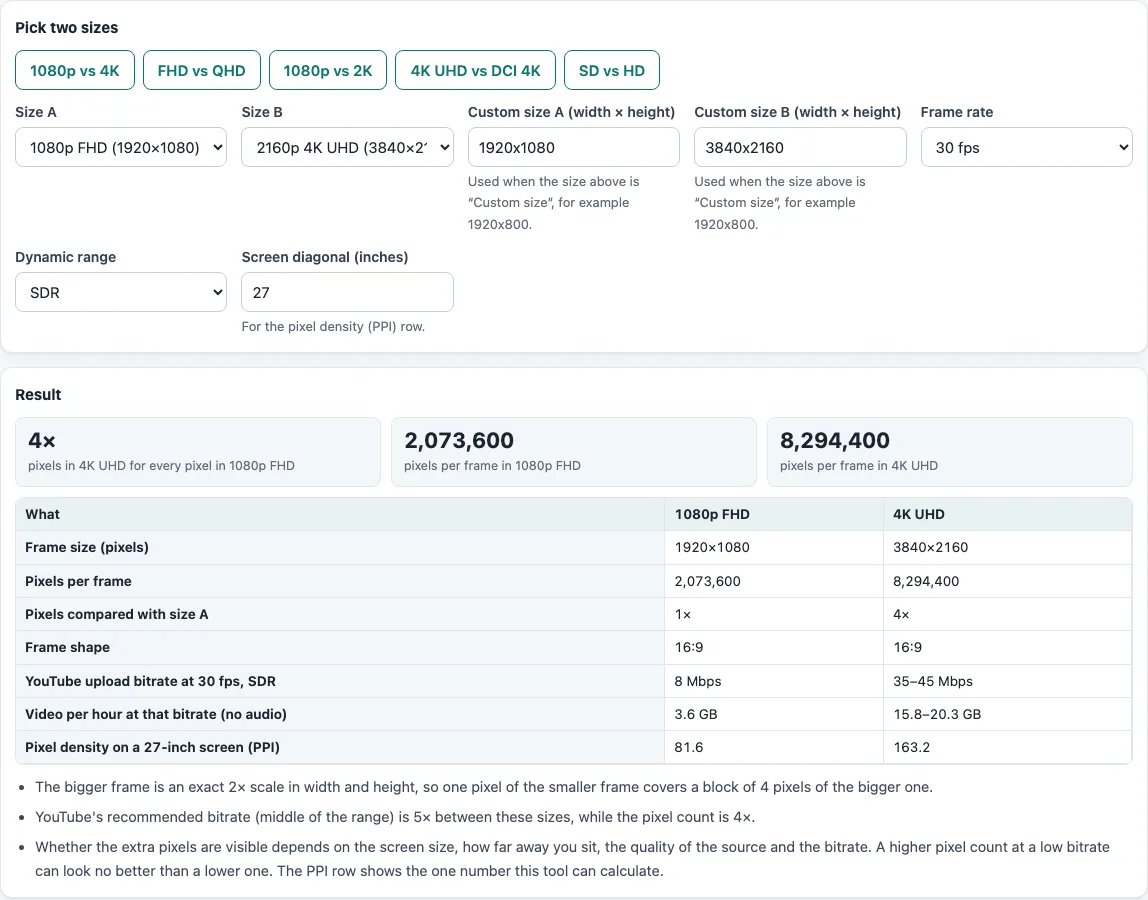
How to use the 1080p vs 4K tool
- In “Pick two sizes”, click a quick button such as “1080p vs 4K”, “FHD vs QHD”, “1080p vs 2K”, “4K UHD vs DCI 4K” or “SD vs HD”. Each button sets Size A and Size B for you.
- To choose your own, open the Size A list. It has SD DVD / NTSC (720×480), 480p SD (854×480), 720p HD (1280×720), 1080p FHD (1920×1080), DCI 2K (2048×1080), 1440p QHD (2560×1440), 2160p 4K UHD (3840×2160), DCI 4K (4096×2160), 8K UHD (7680×4320) and Custom size.
- If you pick Custom size, type the width and height in “Custom size A” or “Custom size B”, for example 1920x800. Each side can be up to 20000 pixels.
- Do the same for Size B.
- Set the Frame rate to 24, 25, 30, 48, 50 or 60 fps. The default is 30 fps.
- Set Dynamic range to SDR or HDR.
- Enter your Screen diagonal in inches. The default is 27, and it only changes the pixel density row.
- Read the Result section. Three boxes show the pixel ratio and the pixels per frame of each size. The table adds the frame shape, YouTube’s upload bitrate, video per hour and PPI. The notes below it say whether one size is an exact whole-number multiple of the other and flag a size with no YouTube row.
Your settings stay in the page address, so you can copy the link to share the same comparison.
Is 4K really 4 times 1080p?
In pixels, yes. A 1080p frame is 1920 by 1080, which is 2,073,600 pixels. A 4K UHD frame is 3840 by 2160, which is 8,294,400 pixels. Width and height are both exactly twice as big, so each 1080p pixel maps onto a 2 by 2 block in 4K.
The file does not grow by 4 times. For 24 to 30 fps SDR, YouTube recommends 8 Mbps for 1080p and 35 to 45 Mbps for 2160p. The middle of the 4K range is 40 Mbps, which is 5 times the 1080p figure. At 48 to 60 fps the numbers are 12 Mbps and 53 to 68 Mbps.
What is the difference between 1080p and 4K?
The difference shows up in three places:
- Pixels per frame: 2,073,600 for 1080p against 8,294,400 for 4K UHD.
- Bitrate and size: video per hour is the bitrate × 3600 ÷ 8. At 8 Mbps, 1080p is 3.6 GB per hour. At 35 to 45 Mbps, 4K is 15.75 to 20.25 GB per hour. These figures are for the video stream only, and audio adds to them.
- Pixel density: PPI is the diagonal in pixels divided by the diagonal in inches. On a 27-inch screen, 1080p gives 81.6 PPI and 4K gives 163.2. On the same panel, 4K always has exactly twice the PPI of 1080p.
Does a higher resolution need a higher bitrate?
Yes, because the resolution only says how many pixels there are, and the bitrate says how much data describes them. YouTube’s 1080p figure of 8 Mbps at 30 fps works out to 0.1286 bits per pixel (8,000,000 ÷ (1920 × 1080 × 30)). Its 40 Mbps middle figure for 4K at 30 fps is 0.1608 bits per pixel, so 4K gets more data per pixel as well as more pixels.
What do FHD, QHD, UHD and DCI 4K mean?
FHD (Full HD) is 1920×1080, QHD is 2560×1440, and UHD, the television 4K, is 3840×2160. DCI 4K is the cinema size, 4096×2160, and DCI 2K is 2048×1080. Do not mix up QHD with the lower-case qHD, which is 960×540. The term “4K” is generic for a width of about 4,000 pixels, and “2K” is generic for about 2,000, so the exact size matters. Wikipedia’s lists of resolutions are the source for these names.
Frequently asked questions
Is 2K the same as 1080p?
It depends on which size is meant. 2K is a generic term for about 2,000 pixels wide. DCI 2K is 2048×1080, and some standards bodies have also called 1920×1080 “2K”. The 2560×1440 size is sometimes sold as 2K but is more traditionally called 2.5K. The tool lists all three with their pixel counts.
4K vs UHD: is 4K the same as UHD?
For TVs and YouTube, yes: 4K UHD is 3840×2160. DCI 4K is 4096×2160 and belongs to digital cinema. It is about 7 percent wider, and the “4K UHD vs DCI 4K” button shows the exact numbers.
What is FHD vs QHD?
FHD is 1920×1080 and QHD is 2560×1440, so QHD has 1.78 times the pixels (3,686,400 against 2,073,600). YouTube’s upload table lists 16 Mbps for 1440p and 8 Mbps for 1080p at 24 to 30 fps.
What is SD vs HD?
SD is the DVD and standard-definition TV frame of 720×480 (NTSC) or 720×576 (PAL). HD starts at 1280×720, which has 2.67 times the pixels of a 720×480 frame. For 480p against 720p, YouTube lists 2.5 and 5 Mbps.
Will I see the difference?
It depends on screen size, viewing distance, the quality of the source video, the bitrate and the player. A 4K file at a low bitrate can look no better than a well-encoded 1080p one. The PPI row is the only figure here that depends on your screen.
Is anything uploaded?
No. All calculation runs in your browser, and nothing is sent anywhere.
Related tools
- 1080p Bitrate: look up YouTube’s recommended bitrate for a resolution and frame rate.
- Video File Size Calculator: get the file size from a bitrate, a length and the audio.
- Video Bitrate Calculator: work out the bitrate that fits a target file size.
- H.264 vs H.265: estimate how much smaller the same video gets with H.265.
- Frame Rate Converter: convert subtitle timing between frame rates and timecodes.